安卓实现MaterialEditText
MaterialEditText是扔物线老师的一个开源项目,我学习的过程中做了一个类似的view,但是我依据他的项目做了一些改进,不过我只实现了提示文字上浮的效果,但是我认为我的这个文字上浮效果比朱老师的效果看着要好一点,我们看看效果:
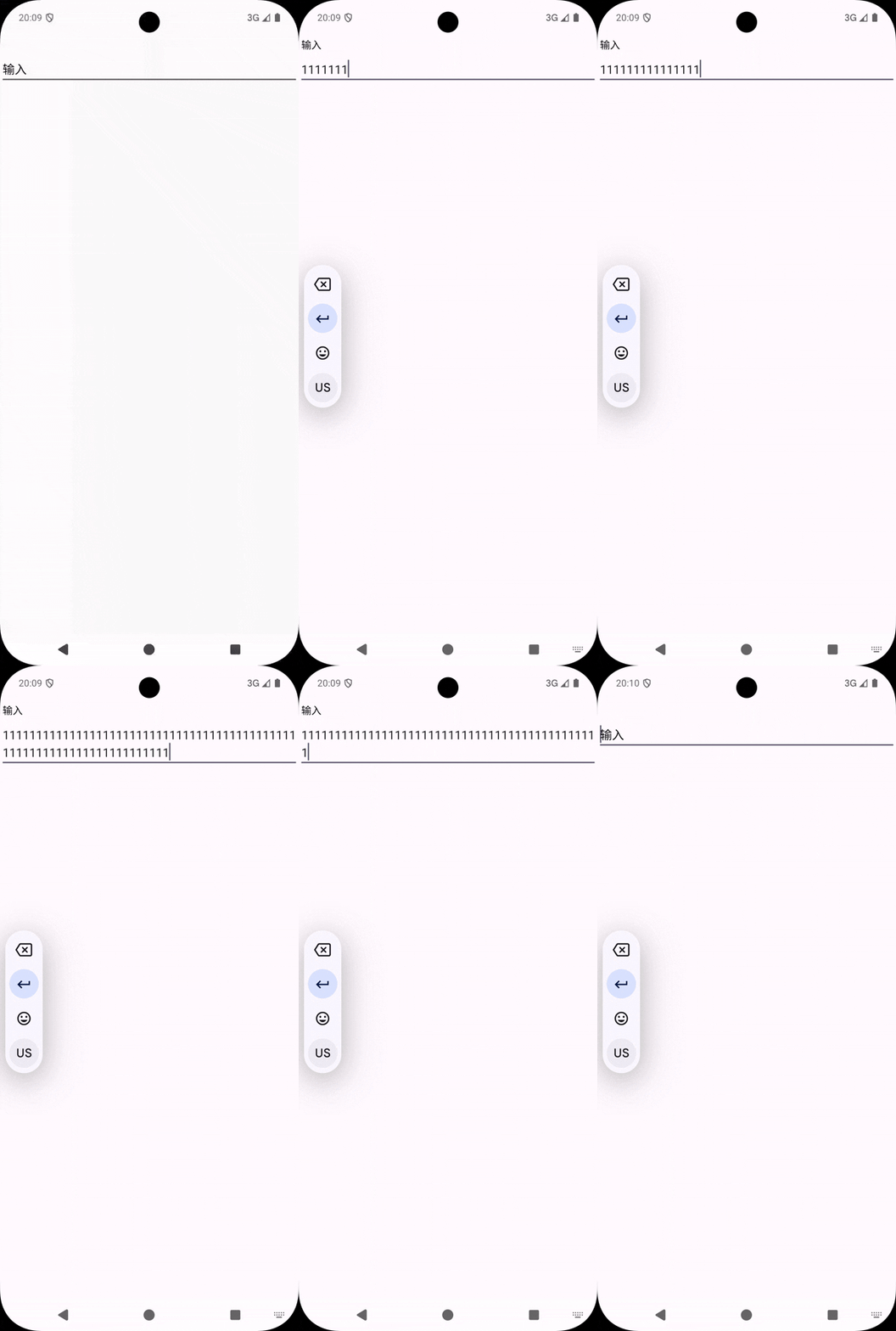
可以看到我hint是真实的从输入框往上动画,朱老师的效果其实是原来的消失,一个假的向上移动。返回时也是移动到下面隐藏,真实的hint出现,下面我们看代码:
代码
package com.example.demo

import android.animation.AnimatorSet
import android.animation.ObjectAnimator
import android.content.Context
import android.graphics.Canvas
import android.graphics.Paint
import android.os.Build
import android.util.AttributeSet
import androidx.annotation.RequiresApi
import androidx.appcompat.widget.AppCompatEditText
import androidx.core.widget.doAfterTextChanged

@RequiresApi(Build.VERSION_CODES.O)
class MaterialEditText(context: Context, attrs: AttributeSet?) : AppCompatEditText(context, attrs) {

    companion object {
        const val TAG = "==================<MaterialEditText>=================="
    }

    private val hintPaint = Paint(Paint.ANTI_ALIAS_FLAG)

    private var hintTextSize = textSize
        set(value) {
            field = value
            invalidate()
        }

    private var hintY: Float = 0f
        set(value) {
            field = value
            if (field!=0f){
                invalidate()
            }
        }
    private val materialHitText: String
    private var preTextEmpty = true
    private val bounds = Paint.FontMetrics()

    private val animator by lazy {
        val d =
            ObjectAnimator.ofFloat(
                this,
                "hintY",
                baseline.toFloat(),
                60f
            )
        val s = ObjectAnimator.ofFloat(
            this,
            "hintTextSize",
            textSize,
            15f.dp()
        )

        val animatorSet = AnimatorSet()
        animatorSet.playTogether(d, s)
        return@lazy animatorSet
    }


    init {
        setPadding(paddingLeft, 80 + paddingTop, paddingRight, paddingBottom)
        materialHitText = hint.toString()
        hint = ""
        hintPaint.textSize = hintTextSize
        hintPaint.getFontMetrics(bounds)
        doAfterTextChanged { t ->
            if (preTextEmpty && !t.isNullOrEmpty()) {
                animator.start()
            }
            preTextEmpty = t.isNullOrEmpty()
            if (text.isNullOrEmpty()) {
                animator.reverse()
            }
        }
    }

    override fun onSizeChanged(w: Int, h: Int, oldw: Int, oldh: Int) {
        super.onSizeChanged(w, h, oldw, oldh)
        if (hintY==0f){
            hintY=baseline.toFloat()
        }
    }

    override fun onDraw(canvas: Canvas) {
        super.onDraw(canvas)
        hintPaint.textSize = hintTextSize
        canvas.drawText(materialHitText, paddingStart.toFloat(), hintY, hintPaint)
    }
}
讲解
使用的是kotlin语言,这里也稍微讲解一下。为了更加真实的移动,我们将原来的hint记录替代了,使用我们自己的绘制。当然,我这里没有做判空等处理,你使用的时候可以自己加上,其他用法跟普通edittext一样。我们这里文字的绘制的y是使用的
int getBaseline()
函数得到的,这个函数是从textview继承下来的,他表示什么呢?表示的是第一行文字的基线位置。当然我们也可以使用
int getLineBaseline(int)
函数自己手动取。最后使用属性动画。这里要说一下
AnimatorSet.reverse()
函数在高版本安卓sdk才有,你使用的时候可以按照需求修改一下。
安卓实现MaterialEditText
https://www.than.pw/archives/019c8016-b6ec-70c8-8f12-169796c38714