安卓自定义view做饼状图
安卓中自定义view是一个比较深入的话题,至少需要了解不少api。这里我使用自定义view实现了一个饼状图,分享出来,已经封装成了view。我们先看看效果:
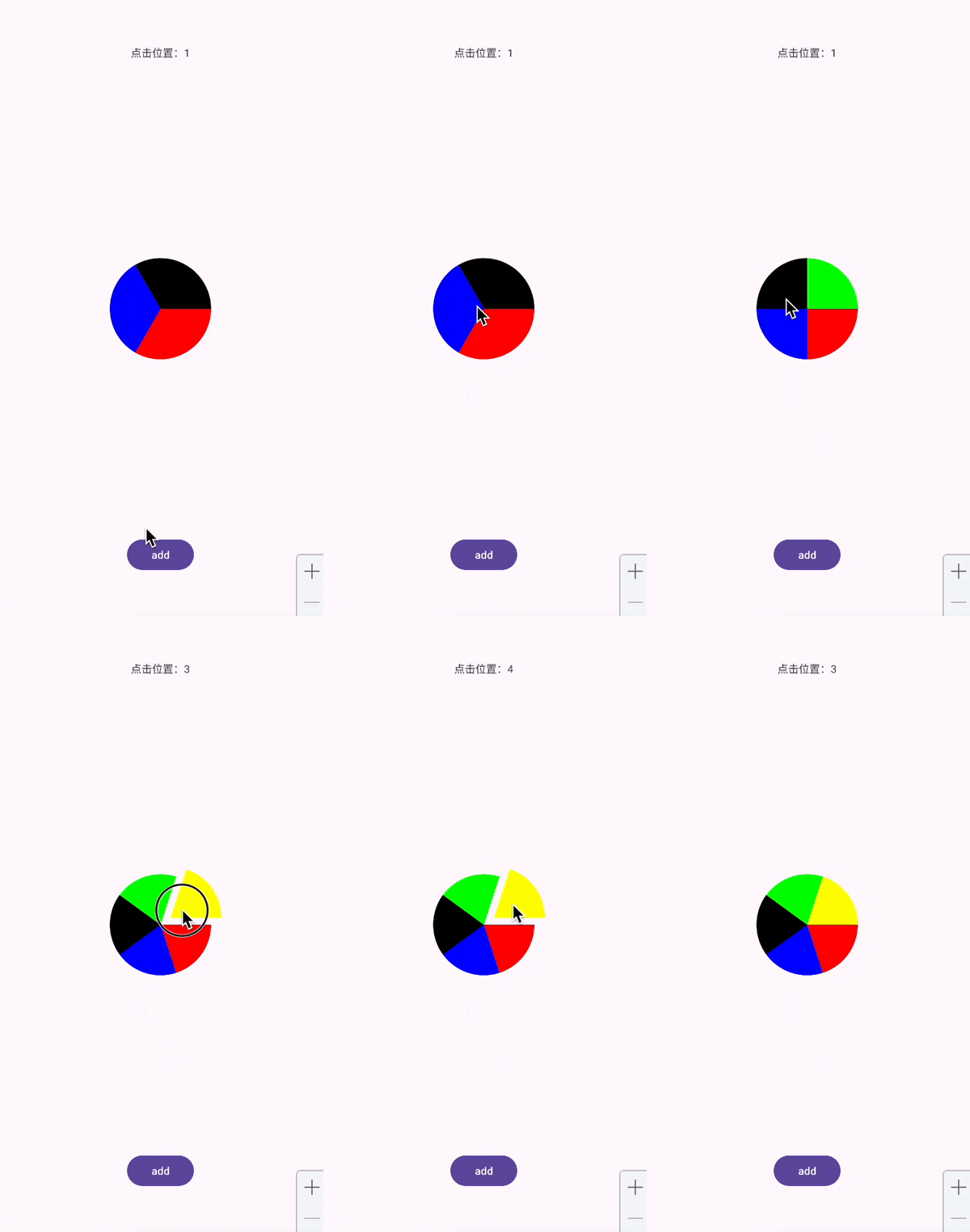
基本功能都不缺少。下面先直接放上完整代码,可以直接复制粘贴使用:
package com.example.demo //记得修改一下包名

import android.animation.Animator
import android.animation.ValueAnimator
import android.content.Context
import android.graphics.Canvas
import android.graphics.Color
import android.graphics.Paint
import android.graphics.Path
import android.util.AttributeSet
import android.view.MotionEvent
import android.view.View
import android.view.ViewConfiguration
import kotlin.math.abs
import kotlin.math.acos
import kotlin.math.cos
import kotlin.math.min
import kotlin.math.sin
import kotlin.math.sqrt

class PanelView(context: Context, attrs: AttributeSet?) : View(context, attrs) {

    companion object {
        const val LENGTH = 200f
    }


    private val list = ArrayList<Float>()
    private val startDegreeList = ArrayList<Float>()
    private val sweepDegreeList = ArrayList<Float>()
    val moveDis = ArrayList<Float>()
    val drawList = ArrayList<Float>()
    private val colors = ArrayList<Int>().apply {
        add(Color.RED)
        add(Color.BLUE)
        add(Color.BLACK)
        add(Color.GREEN)
        add(Color.YELLOW)
        add(Color.CYAN)
    }
    private val paths = ArrayList<Path>()

    private val touchSlop by lazy {
        val configuration = ViewConfiguration.get(context)
        configuration.scaledPagingTouchSlop
    }

    private var downX = 0f
    private var downY = 0f

    private val openAnimator = ValueAnimator.ofFloat(0f, 1f).apply {
        addUpdateListener {
            for ((i, f) in clickList.withIndex()) {
                moveDis[i] = f * it.animatedValue as Float
            }
            invalidate()
        }
    }

    private val closeAnimator = ValueAnimator.ofFloat(1f, 0f).apply {
        addUpdateListener {
            for ((i, f) in moveDis.withIndex()) {
                moveDis[i] = f * it.animatedValue as Float
            }
            invalidate()
        }

        addListener(object : Animator.AnimatorListener {
            override fun onAnimationCancel(animation: Animator) {
            }

            override fun onAnimationEnd(animation: Animator) {
                if (::block.isInitialized) {
                    block(clickIndex)
                }
            }

            override fun onAnimationRepeat(animation: Animator) {
            }

            override fun onAnimationStart(animation: Animator) {
            }
        })
    }

    private lateinit var block: (Int) -> Unit
    private var clickIndex: Int = 0


    fun add(value: Float) {
        list.add(value)
        initLists()
        val animator = ValueAnimator.ofFloat(0f, 1f).apply {
            addUpdateListener {
                for ((index, f) in sweepDegreeList.withIndex()) {
                    drawList[index] = f * (it.animatedValue as Float)
                }
                invalidate()
            }
        }
        animator.duration = 2000
        animator.start()
    }

    fun addClick(block: (Int) -> Unit) {
        this.block = block
    }

    private val clickList = ArrayList<Float>()


    override fun onTouchEvent(event: MotionEvent): Boolean {
        when (event.action) {
            MotionEvent.ACTION_DOWN -> {
                downX = event.x
                downY = event.y
                val index = isPointInSector(downX, downY)
                clickIndex = index

                if (index != -1) {
                    clickList.clear()
                    clickList.addAll(moveDis)
                    clickList[index] = 50f

                    openAnimator.duration = 200
                    openAnimator.start()
                }
                return true
            }

            MotionEvent.ACTION_UP -> {
                if (abs(event.x - downX) < touchSlop.toFloat() && abs(event.y - downY) < touchSlop.toFloat()) {
                    closeAnimator.duration = 200
                    closeAnimator.start()
                }

            }
        }
        return super.onTouchEvent(event)
    }

    private fun isPointInSector(x: Float, y: Float): Int {
        //移动一下坐标系到view中心位置,由于这里是点击事件用,这时候view已经有了宽高
        val newX = x - width / 2
        val newY = y - height / 2
        val module = sqrt(newX * newX + newY * newY)

        if (module > LENGTH) {
            return -1
        }

        val cosValue = (newX * 1 + newY * 0) / module * 1
        var degrees = Math.toDegrees(acos(cosValue).toDouble())
        //判断点所在象限,如果在 1 2象限,那度数应该是360-degree,否则就直接是反三角计算出来的度数
        if (newX < 0 && newY < 0 || newX > 0 && newY < 0) {
            degrees = 360 - degrees
        }
        for ((index, f) in startDegreeList.withIndex()) {
            if (degrees > f && degrees < f + sweepDegreeList[index]) {
                return index
            }
        }
        return -1
    }

    override fun onSizeChanged(w: Int, h: Int, oldw: Int, oldh: Int) {
        initLists()
    }

    private val paint = Paint(Paint.ANTI_ALIAS_FLAG).apply {
        style = Paint.Style.FILL
        strokeWidth = 5f
    }


    private fun initLists() {
        sweepDegreeList.clear()
        startDegreeList.clear()
        drawList.clear()
        paths.clear()
        moveDis.clear()
        val sum = list.sum()
        for (f in list) {
            val sweep = (f / sum) * 360
            sweepDegreeList.add(sweep)
            drawList.add(0f)
        }
        var lastDegree = 0f
        for (f in sweepDegreeList) {
            startDegreeList.add(lastDegree)
            lastDegree += f
        }
        for (i in 0 until drawList.size) {
            paths.add(Path())
            moveDis.add(0f)
        }
    }

    override fun onDraw(canvas: Canvas) {

        for (i in 0 until drawList.size) {
            paths[i].reset()
            paths[i].arcTo(
                (width / 2f) - LENGTH
                        + moveDis[i] * cos(
                    Math.toRadians(startDegreeList[i].toDouble() + sweepDegreeList[i] / 2).toFloat()
                ),
                (height / 2f) - LENGTH
                        + moveDis[i] * sin(
                    Math.toRadians(startDegreeList[i].toDouble() + sweepDegreeList[i] / 2).toFloat()
                ),
                (width / 2f) + LENGTH
                        + moveDis[i] * cos(
                    Math.toRadians(startDegreeList[i].toDouble() + sweepDegreeList[i] / 2).toFloat()
                ),
                (height / 2f) + LENGTH
                        + moveDis[i] * sin(
                    Math.toRadians(startDegreeList[i].toDouble() + sweepDegreeList[i] / 2).toFloat()
                ),
                startDegreeList[i],
                min(drawList[i], 359.99f),
                true
            )
            paths[i].lineTo(
                width / 2f
                        + moveDis[i] * cos(
                    Math.toRadians(startDegreeList[i].toDouble() + sweepDegreeList[i] / 2).toFloat()
                ),
                height / 2f
                        + moveDis[i] * sin(
                    Math.toRadians(startDegreeList[i].toDouble() + sweepDegreeList[i] / 2).toFloat()
                )
            )
            paths[i].close()
            paint.color = colors[i % 6]
            canvas.drawPath(paths[i], paint)
        }
    }
}
这个view的使用也非常简单,直接在布局文件中使用就行了:
    <com.example.demo.PanelView
        android:id="@+id/view"
        android:layout_width="match_parent"
        android:layout_height="match_parent"
        app:layout_constraintBottom_toBottomOf="parent"
        app:layout_constraintEnd_toEndOf="parent"
        app:layout_constraintStart_toStartOf="parent"
        app:layout_constraintTop_toTopOf="parent" />
这里稍微讲解一下代码。我们这里使用的是值动画来实现的添加和移动扇区效果,不过我最初的想法其实是使用属性动画来实现。使用属性动画其实也是可以实现的,但是实现起来其实比较曲折,需要首先定义TypeEvaluator,然后再修改内部管理各个部分的list的值。麻烦不说,性能应该也不会太好,使用值动画简单许多。直接使用0-1的动画值,相当于映射为了时间轴上的动画。只需要监听值更新即可。但是其实真正让我放弃使用属性动画的并不是上述原因,因为其实当时我已经写出了了使用属性动画的版本,但是我遇到了一个bug,我发现当列表中自由一个值的时候,绘制会出现问题。当绘制到最后,整个图形会消失不见。我排除了很多原因,最后发现是path绘制的bug,path在绘制的时候,如果绘制的扇区的度数是360度,那么这个扇区就会直接消失不见,网上和ai都能查到这个问题,很离谱。当时我在排查过程中将属性动画也换成了值动画,但是问题还是没有消失,最后将drawList[i]换成了min(drawList[i], 359.99f)才解决问题。这个其实也是一个比较值得记录的点。没有自己写很难知道这个坑😇。其他部分就比较简单了。
代码是直接写出来没有经过修饰的,所以可能有些地方有不合理和不优雅之处,有能力的同学可以自己优化一下。
这里也放一下当时使用属性动画的半成品,代码也没修饰过:
package com.example.demo

import android.animation.Animator
import android.animation.AnimatorSet
import android.animation.ObjectAnimator
import android.animation.TypeEvaluator
import android.animation.ValueAnimator
import android.content.Context
import android.graphics.Canvas
import android.graphics.Color
import android.graphics.Paint
import android.graphics.Path
import android.graphics.PathMeasure
import android.graphics.Rect
import android.graphics.RectF
import android.util.AttributeSet
import android.util.Log
import android.view.MotionEvent
import android.view.View
import android.view.animation.AnimationSet
import android.widget.Toast
import kotlin.math.acos
import kotlin.math.cos
import kotlin.math.sin
import kotlin.math.sqrt

class PanelView(context: Context, attrs: AttributeSet?) : View(context, attrs) {

    private val list = ArrayList<Float>()
    private val startDegreeList = ArrayList<Float>()
    private val sweepDegreeList = ArrayList<Float>()
    var moveDis = ArrayList<Float>()
        set(value) {
            field = value
            invalidate()
        }
    var drawList = ArrayList<Float>()
        set(value) {
            field = value
            invalidate()
        }
    private val colors = ArrayList<Int>().apply {
        add(Color.RED)
        add(Color.BLUE)
        add(Color.BLACK)
        add(Color.GREEN)
        add(Color.YELLOW)
        add(Color.CYAN)
    }
    private val paths = ArrayList<Path>()

    companion object {
        const val LENGTH = 200f
    }

    inner class SweepEvaluator : TypeEvaluator<ArrayList<Float>> {
        override fun evaluate(
            fraction: Float,
            startValue: ArrayList<Float>,
            endValue: ArrayList<Float>
        ): ArrayList<Float> {
            for ((index, _) in sweepDegreeList.withIndex()) {
                val res = endValue[index] * fraction
                drawList[index] = res
            }
            return drawList
        }
    }

    inner class MoveEvaluator : TypeEvaluator<ArrayList<Float>> {
        override fun evaluate(
            fraction: Float,
            startValue: ArrayList<Float>,
            endValue: ArrayList<Float>
        ): ArrayList<Float> {
            for ((index, f) in endValue.withIndex()) {
                moveDis[index] = fraction * f
            }
            return moveDis
        }
    }

    fun add(value: Float) {
        list.add(value)
        computeDegree()
        val animator = ObjectAnimator.ofObject(
            this,
            "drawList",
            SweepEvaluator(),
            sweepDegreeList
        )
        animator.duration = 2000
        animator.start()
    }

    private var downX = 0f
    private var downY = 0f

    override fun onTouchEvent(event: MotionEvent): Boolean {
        when (event.action) {
            MotionEvent.ACTION_DOWN -> {
                downX = event.x
                downY = event.y
                val index = isPointInSector(downX, downY)
                if (index != -1) {
                    val list = ArrayList<Float>()
                    list.addAll(moveDis)
                    list[index] = 50f
                    val animator = ObjectAnimator.ofObject(
                        this,
                        "moveDis",
                        MoveEvaluator(),
                        list
                    )
                    animator.duration = 2000
                    animator.start()
                }
            }
        }

        return super.onTouchEvent(event)
    }


    private fun isPointInSector(x: Float, y: Float): Int {
        //移动一下坐标系到view中心位置,由于这里是点击事件用,这时候view已经有了宽高
        val newX = x - width / 2
        val newY = y - height / 2
        val module = sqrt(newX * newX + newY * newY)

        if (module > LENGTH) {
            return -1
        }

        val cosValue = (newX * 1 + newY * 0) / module * 1
        var degrees = Math.toDegrees(acos(cosValue).toDouble())
        //判断点所在象限,如果在 1 2象限,那度数应该是360-degree,否则就直接是反三角计算出来的度数
        if (newX < 0 && newY < 0 || newX > 0 && newY < 0) {
            degrees = 360 - degrees
        }
        for ((index, f) in startDegreeList.withIndex()) {
            if (degrees > f && degrees < f + sweepDegreeList[index]) {
                return index
            }
        }
        return -1
    }

    override fun onSizeChanged(w: Int, h: Int, oldw: Int, oldh: Int) {
        computeDegree()
    }

    private val paint = Paint(Paint.ANTI_ALIAS_FLAG).apply {
        style = Paint.Style.FILL
        strokeWidth = 5f
    }


    private fun computeDegree() {
        sweepDegreeList.clear()
        startDegreeList.clear()
        drawList.clear()
        paths.clear()

        val sum = list.sum()
        for (f in list) {
            val sweep = (f / sum) * 360
            sweepDegreeList.add(sweep)
            drawList.add(0f)
        }

        var lastDegree = 0f
        for (f in sweepDegreeList) {
            startDegreeList.add(lastDegree)
            lastDegree += f
        }

        for (i in 0 until drawList.size) {
            paths.add(Path())
            moveDis.add(0f)
        }

    }

    override fun onDraw(canvas: Canvas) {
        for (i in 0 until drawList.size) {
            Log.e("==============", "onDraw: ${drawList[i]}")
            paths[i].reset()

            paths[i].arcTo(
                (width / 2f) - LENGTH
                        + moveDis[i] * cos(
                    Math.toRadians(startDegreeList[i].toDouble() + sweepDegreeList[i] / 2).toFloat()
                ),
                (height / 2f) - LENGTH
                        + moveDis[i] * sin(
                    Math.toRadians(startDegreeList[i].toDouble() + sweepDegreeList[i] / 2).toFloat()
                ),
                (width / 2f) + LENGTH
                        + moveDis[i] * cos(
                    Math.toRadians(startDegreeList[i].toDouble() + sweepDegreeList[i] / 2).toFloat()
                ),
                (height / 2f) + LENGTH
                        + moveDis[i] * sin(
                    Math.toRadians(startDegreeList[i].toDouble() + sweepDegreeList[i] / 2).toFloat()
                ),
                startDegreeList[i],
                drawList[i],
                true
            )
            paths[i].lineTo(
                width / 2f
                        + moveDis[i] * cos(
                    Math.toRadians(startDegreeList[i].toDouble() + sweepDegreeList[i] / 2).toFloat()
                ),
                height / 2f
                        + moveDis[i] * sin(
                    Math.toRadians(startDegreeList[i].toDouble() + sweepDegreeList[i] / 2).toFloat()
                )
            )
            paths[i].close()
            paint.color = colors[i % 6]
            canvas.drawPath(paths[i], paint)
        }
    }
}
只能说也有一定参考意义吧。这里还想感叹一下,AS这个文件的历史版本还是比较好用的。